The Necessity of Git in the Vibe Coding Era
A practical Git workflow guide for human-AI collaboration, aimed at researchers
This article is primarily for researchers who are not yet proficient in using Git and GitHub to manage code, explaining why these two tools are essential for vibe coding. For simplicity, this article will not distinguish between Git and the GitHub website, using "Git" to refer to both.
Introduction: The Trust Crisis in AI-Generated Code
When you ask AI to write code, a fundamental problem arises: How do you know the code actually works? AI can generate thousands of lines of plausible-looking code in seconds, but "plausible" doesn't mean "correct." Without a systematic approach, AI-assisted coding quickly devolves into a trust crisis, leaving you drowning in untested, unreliable code.
In a previous blog post, we explored how test-driven development solves the correctness problem—using tests as "syndromes" to verify AI-generated code.
But testing alone isn't enough—especially for scientists accustomed to writing research code independently. When AI becomes your coding partner, you need a workflow that ensures safety, supports planning, and enables review at scale.
This is where Git becomes essential.
Git is not just version control—it's the operating system for human-AI collaboration. It provides:
A safety net that makes every change reversible. Each change is saved as a commit (a snapshot with a message describing what changed). You work on branches (isolated copies of the codebase), keeping main (the primary branch) stable until changes are verified.
A planning framework through Issues—tickets that describe a task, bug, or feature request before any code is written.
A review gate through Pull Requests (PRs)—when you want to merge a branch into main, you open a PR that shows all the changes for review and discussion.
An automation layer through CI/CD (Continuous Integration / Continuous Deployment)—automated pipelines (often via GitHub Actions) that run tests, linters, and checks on every PR.
Why does this matter more than ever? Let's dive deeper.
Part 1: Feel — How Development Has Changed in the AI Era
From Solo Development to Human-AI Collaboration
In the past, Git workflows primarily served human-to-human collaboration. Solo developers could commit directly to main, bypass code review, test manually (or not at all)—with complete freedom. Open source contributors, on the other hand, had to create PRs, pass reviews, and meet CI requirements.
If you didn't want to collaborate, you could ignore all the "best practices" and hack freely in your own repo. Many developers did exactly this.
LLMs Reshape the Collaboration Model
The new reality: Even solo developers are now collaborating—with AI. Before LLMs, the flow was simple: You → Your Code, with full control. Now it's: You → AI Agent → Your Code—shared control with a non-human collaborator.
When you use AI to write code, you're no longer the only author. Your AI collaborator:
Codes faster than you can review
Confidently introduces errors
Cannot understand your project's full context
Won't be held accountable for the bugs it creates
Without guardrails, AI-generated code could silently break your project.
The New Reality
| Before LLMs | After LLMs |
|---|---|
| "I wrote it, I trust it" | "AI wrote it, I must verify it" |
| Code review = optional for solo devs | Code review = essential (you review AI) |
| CI/CD = nice to have | CI/CD = critical safety net |
| Branches = for teams | Branches = for isolating AI experiments |
| "Move fast, break things" | "Move fast, but guard against AI mistakes" |
The Git workflow once considered "overkill" for solo projects is now essential. So how do we allow AI to work efficiently while maintaining control? We need a systematic solution.
Part 2: Imagine — Git-Based Safety Workflow
Git as a Systematic Safety Net
Git-based workflows provide correctness guarantees through structured collaboration. The key insight: tools designed for human collaboration perfectly fit human-AI collaboration scenarios.
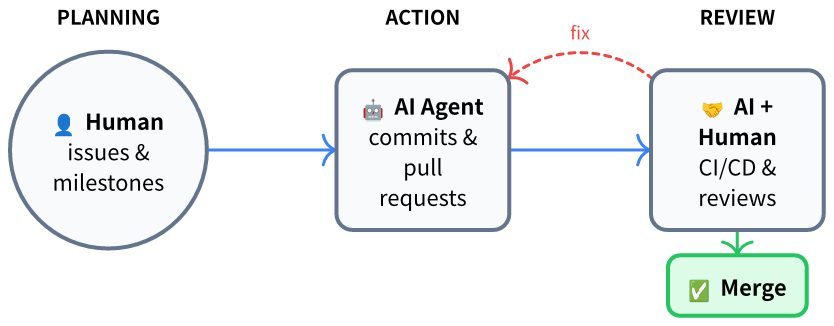
The workflow has three phases:
Planning: Humans define goals through Issues and Milestones, providing clear guidance for AI.
Action: AI agent implements features through commits and pull requests, handling the main coding work.
Review: Both AI (via CI/CD) and humans verify results through automated tests and code review.
If problems are found, the workflow forms a feedback loop: AI fixes the code until it passes all checks. Then humans approve and merge to main. This establishes clear trust boundaries: AI can create and propose, humans approve and control. AI has write access to branches, but only humans have merge access to main.
Each component catches different types of errors:
| Component | What It Catches | Why It Matters for AI |
|---|---|---|
| Issue | Unclear requirements | AI needs clear specs to generate correct code |
| Branch | Damage to working code | Isolates AI's potential errors before verification |
| Pull Request | Unreviewed changes | Creates mandatory discussion point before merge |
| CI/CD | Syntax errors, test failures | Automatically catches AI "hallucinations" |
| Review | Logic errors, style violations | Human catches what automation misses |
| Merge | Unapproved changes | Nothing reaches production without human consent |
Anti-Pattern vs. Best Practice
❌ Dangerous: Letting AI commit directly to main → broken production.
✅ Safe: AI opens PR → Review → CI/CD → Human approves → Merge → verified code reaches main.
Part 3: Do — A Complete Example from Issue to Merge
Let's demonstrate the complete workflow using Issue #11 from the ILPQEC project (an integer linear programming quantum error correction package), resolved by PR #13.
Prerequisites: Install Git and GitHub CLI (
gh). You can prompt AI to execute:
prompt> Install git and gh on my system, authenticate gh with my GitHub accountPhase 1: Planning — Start with an Issue
I wanted to benchmark our ILP decoder against Google's tesseract-decoder. Rather than rushing to open an editor, I created an Issue (#11):
Ref: https://github.com/quantumlib/tesseract-decoder

## TODOs:
1. Setup a local env for benchmarking.
2. Setup a dataset for benchmarking.
3. Compare the logical error rate and computing time.
4. Run a benchmark.
5. Clearly document this result.

Note: this is for winter school demonstration. @nzy1997
On one hand, I wanted the Issue to serve as a plan showcase, enabling discussion with the software author and uncovering potential problems.
Key principle: "Issue First, No Issue, No Action." Issues create space for discussion before code is written.
Issues ≠ TODOs
A common misconception: issues are just TODO lists. They're not. An issue is not a commitment to implement—it's an invitation to discuss.
Humans have ideas all the time. Some are brilliant, some are impractical, some sound crazy but turn out to be breakthroughs. Record them all. The most beautiful ideas in your project will come from these moments of inspiration—but only if you capture them before they fade.
Don't hesitate to open an issue whenever a new idea strikes you. Issues are for resolving uncertainty, not just for decided things without uncertainty. That half-formed thought about a better algorithm? Write an issue. That wild feature idea you're not sure is feasible? Write an issue. That nagging feeling something could be improved? Write an issue.
The issue becomes a space where:
You clarify your own thinking by writing it down
Collaborators (human or AI) can ask questions and poke holes
The idea can mature through discussion before any code is written
You can decide not to implement it—and that's perfectly fine
Issues are cheap. Wasted implementation effort is expensive. Write the issue first.
Phase 2: Action — AI Creates a Pull Request
With the issue defined, type in Claude Code or Cursor:
prompt> Fix issue #11 of repo: https://github.com/nzy1997/ILPQEC by creating a pr, use gh.What the AI did (PR #13):
The AI created a feature branch, implemented the code changes, and automatically opened a PR:
## Summary
- Add tesseract-decoder support to `benchmark_decoders.py`
- Add `build_tesseract()` function to construct tesseract decoder from Stim DEM
- Add CLI flags `--skip-tesseract` and `--tesseract-beam` for configuration
- Update README.md and docs/benchmarks.md with tesseract references

## Test plan
- [ ] Install tesseract-decoder: `pip install tesseract-decoder`
- [ ] Run benchmark: `python benchmark/benchmark_decoders.py --shots 1000 --distance 3`
- [ ] Verify tesseract decoder output is included in results

Closes #11
Files changed: 3 files (+87 lines, -46 lines)
Phase 3: Review — The Iteration Loop
This is where the workflow shines. The PR wasn't merged immediately—it went through iterations:
CI/CD runs automatically → GitHub Actions ran the test suite on the PR. Tests passed, but linting flagged a style issue.
AI review → Clicked "Review by Copilot" on GitHub. Copilot flagged an import error.
Human review → Go to the PR page, click "Files changed" tab to see the diff. Click the "+" button next to any line to leave a comment.
Fix the issues → Type in Claude Code or Cursor:
prompt> Check PR comments, fixAI agent fixed all comments and pushed the changes to the branch. CI/CD re-runs automatically on the new commits.
Additional fixes → The maintainer noticed the benchmark wasn't run on the same machine:
prompt> Run the benchmark locally, document the benchmark results in README/docs.AI agent ran the benchmark and documented the results.
Merge → Once CI passes and review is complete:
prompt> Merge PR #13, use gh.Finally, the author merged the PR, and Issue #11 was automatically closed.
Result: ~15 minutes of human time. AI did the heavy lifting. The final result is PR #13.
Part 4: Share — Leave a Trail
Imagine this: your advisor asks "what did you accomplish this week?" or a colleague wants to build on your work. You vaguely remember fixing something important with AI, but the chat history is gone, and the commits just say "fix bug." Six months later, returning to this code—you've completely forgotten why you made those changes, and AI certainly won't remember.
Without documentation, AI-assisted work becomes a black box. AI generates code, but documentation gives code credibility and reproducibility.
After completing each task, systematically document:
Root cause: Link to the related Issue
Solution: Key decisions and reasoning
Verification: Tests run, benchmarks, manual checks
prompt> Document what we did to fix issue #11 in the PR description.Best Practices for Documentation
Use issues liberally. Don't just create one issue per feature—create sub-issues for complex tasks, and use comments to record discussions, decisions, and dead ends. Future you will thank past you for writing "tried approach X, failed because Y, switched to Z."
Save logs and outputs. Create a logs/ folder in your repo. When you run experiments or benchmarks, save the output with a date signature:
logs/
├── 2026-01-15_benchmark_v1.log
├── 2026-01-18_benchmark_v2.log
└── 2026-01-22_benchmark_final.log
This creates a traceable history of your results—essential for research reproducibility.
Git captures what changed. Documentation captures why and how you know it works.
Conclusion: Humans Are Issue Makers
In the vibe coding era, Git has undoubtedly become more important than ever. In the Git workflow, Issues are the most critical element.
Looking back at this entire workflow, you'll discover a striking fact: the human's role in development is merely to record issues, discuss issues, plan issues, and ultimately confirm whether issues are resolved. It's the AI that solves the problems.
Therefore, the conclusion: "Humans are essentially Issue Makers!" — This is the one thing AI cannot replace, no matter what.
References and Further Reading
Vibe Coding Done Right - Test-driven approach to AI-assisted coding
ILPQEC Project - Real example of this workflow
GitHub CLI Documentation - Learn
ghcommandsGitHub Actions Documentation - Set up CI/CD
Git Documentation - Master version control
Acknowledgments
This blog was inspired by discussions with Lei Wang, Siyuan Chen, and Longli Zheng.